 Skip to content
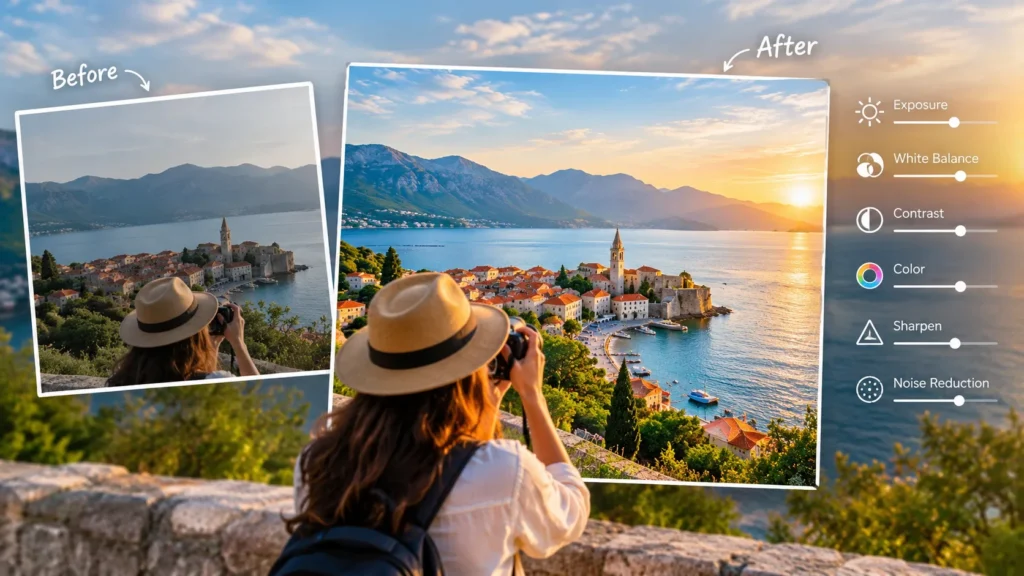
Travel photos should bring you back to a place, not make that place look completely different. Yet it is easy to push the contrast too far, oversaturate a sunset, or smooth away details until a natural scene starts looking artificial. The best travel photo editing improves what the camera captures while keeping the mood, colors, and character of the destination intact. With a few thoughtful adjustments to light, composition, color, and detail, you can create polished images that still feel true to the experience.
What Does Natural Travel Photo Editing Actually Mean?
Natural editing means improving a photo without changing the essential character of the scene. You might brighten a dark foreground, correct a tilted horizon, reduce an unwanted color cast, or bring back detail in a bright sky. These changes help the image look closer to what you remember seeing.
The goal is not to avoid editing. Almost every digital image can benefit from some adjustment. Cameras make technical decisions about exposure, white balance, contrast, and color. Those decisions do not always match what your eyes experienced. A careful edit helps close that gap.
Problems begin when editing becomes more noticeable than the photograph itself. Electric-blue water, glowing buildings, extreme orange sunsets, and unnaturally sharp mountains may attract attention for a moment, but they can also remove the sense of place that makes travel photography valuable.
Takeaway: Natural editing improves visibility, balance, and mood while keeping the destination believable.
How Should You Start Editing a Travel Photo?
Start with corrections rather than creative effects. Before changing colors or applying a preset, look for basic issues that affect the entire image.
Check whether the horizon is level. Look at the crop and remove empty or distracting areas around the edges. Then review exposure. If the image is too dark or bright, make a small adjustment before working on individual parts of the photograph.
A useful editing order is:
- Straighten the horizon.
- Crop for stronger composition.
- Correct overall exposure.
- Recover highlights and shadows if necessary.
- Adjust white balance.
- Refine contrast and color.
- Add light sharpening.
- Review the final image at normal size.
Working in this order reduces the temptation to fix a basic problem with an aggressive effect. For example, a flat-looking mountain photograph might simply need better exposure and contrast, rather than a dramatic preset.
Takeaway: Fix composition and exposure first. Creative adjustments should come after the basic photograph looks balanced.
How Can You Use Filters Without Making Photos Look Artificial?
Filters can save time because they adjust several visual characteristics at once. However, their default strength is often stronger than a travel photo needs.
When using an image filter online, treat the filter as a starting point rather than a finished edit. Apply a style that fits the existing light and mood, then reduce its intensity until the effect becomes subtle. Afterward, review exposure, skin tones, skies, and natural surfaces such as grass or water.
For example, a warm filter may work well for a street scene photographed near sunset. At full strength, however, it could make white buildings yellow and people’s skin orange. Reducing the effect can preserve the evening atmosphere without changing the scene too much.
Consistency also matters when editing a collection from one trip. Using similar color and contrast choices can make a gallery feel connected. That does not mean every photograph needs exactly the same filter. A cloudy mountain landscape and a brightly lit food market may need different treatment even if they were photographed on the same day.
Takeaway: Use filters to establish a direction, then lower their strength and fine-tune the photo so the effect supports the scene instead of dominating it.
How Do You Correct Exposure While Keeping Detail?
Exposure controls how bright or dark the overall photograph appears. A small exposure adjustment can transform an image, but large changes may remove important detail.
Travel photography often involves difficult lighting. You may photograph a narrow street with bright sky above it, a person standing in front of a sunny landscape, or a mountain where one side is covered in shadow. In these situations, changing global exposure alone may not solve the problem.
Use highlight and shadow controls carefully. Lowering highlights can recover detail in clouds and bright walls. Raising shadows can reveal details in streets, buildings, clothing, or landscapes. Avoid pushing either adjustment to its limit because excessive recovery can make the image look flat.
The histogram can also help. A histogram is a graph showing how brightness values are distributed across an image, from dark tones on the left to bright tones on the right. Adobe’s guide to understanding histograms in photography explains how the graph can help photographers evaluate exposure.
Takeaway: Adjust exposure gently and use highlight and shadow controls to recover useful detail without removing natural contrast.
How Can You Improve Color Without Oversaturating the Scene?
Color is one of the easiest areas to overedit. Increasing saturation can initially make an image seem more exciting, but too much creates unnatural skies, skin tones, plants, food, and architecture.
Start with white balance. White balance controls how warm or cool the colors in a photograph appear. If a daylight photograph looks strangely blue, or an indoor restaurant image appears excessively orange, a white balance correction may solve most of the problem.
After that, make small color adjustments. Vibrance is often useful when available because it tends to affect less-saturated colors more selectively than a global saturation adjustment. Still, every control should be judged by the actual image rather than a fixed numerical rule.
Use familiar objects as visual references. Human skin, white walls, gray roads, clouds, and green plants can quickly reveal when colors have moved too far from reality. If you visited a coastal town with pale turquoise water, for example, turning it into deep neon blue may make the photograph more dramatic but less representative of the destination.
Takeaway: Correct white balance first, then add color carefully. Familiar objects can help you judge whether the final colors still look believable.
Why Does Composition Matter More Than Heavy Editing?
A strong composition can improve a travel photograph more effectively than an intense filter. Cropping changes where the viewer looks and can remove elements that compete with the subject.
Start by checking the edges of the frame. A partial sign, random arm, bright object, or large empty area can pull attention away from the main subject. A small crop may solve the problem immediately.
Also consider the horizon and major architectural lines. A slightly tilted ocean horizon can make an otherwise excellent beach photograph feel unfinished. Buildings can naturally show perspective distortion when photographed from below, so avoid forcing every line to become perfectly vertical if doing so makes the image unnatural.
Composition is especially important for travel storytelling. Instead of cropping every scene tightly, keep environmental details when they add context. A market stall becomes more interesting when viewers can see part of the surrounding street. A mountain trail may communicate scale better when a hiker remains small within the landscape.
Takeaway: Crop to remove distractions and strengthen the subject, but keep environmental details that help tell the story of the destination.
How Much Sharpness and Clarity Should You Add?
Sharpness helps define edges and fine details. Clarity generally increases contrast around midtone details, making textures appear stronger. Both can improve travel photographs, but both are easy to overuse.
Architecture, mountains, and detailed street scenes may benefit from moderate sharpening. Portraits usually need a softer approach because aggressive sharpening can emphasize pores, wrinkles, and small skin details. Excessive clarity can also create unnatural halos around buildings and mountain ridges.
Evaluate sharpness at a reasonable viewing size. Zooming deeply into a photograph can encourage you to fix tiny imperfections that nobody will notice when the image appears in an article or travel gallery.
Noise reduction requires similar restraint. Digital noise is the grain-like variation that often becomes visible in photographs taken in low light or at high ISO settings. Some noise can be preferable to aggressive smoothing, which may erase textures from stone, fabric, hair, or foliage.
Takeaway: Add only enough sharpening, clarity, and noise reduction to improve readability. Natural texture should remain visible.
How Can You Keep People Looking Natural in Travel Photos?
People give travel photography scale, emotion, and context. They also make overediting easier to notice.
Pay close attention to skin tone. Global color changes that make a landscape richer can make faces look orange, red, gray, or unusually smooth. If people are important subjects, judge the edit partly by how their skin looks rather than by the scenery alone.
Avoid excessive skin smoothing and reshaping. Small temporary distractions may sometimes be worth correcting, but changing facial features or removing natural texture can make documentary-style travel photography feel artificial.
The same principle applies to local people photographed during a trip. Editing should preserve dignity and authenticity. The National Geographic Society’s resources on photography and visual storytelling can provide useful context for thinking about images as records of people and places rather than simply decorative content.
Takeaway: When people appear in travel photos, prioritize believable skin tones, natural texture, and an authentic representation of the moment.
What Is a Simple Checklist for Avoiding Overediting?
One of the best ways to judge an edit is to stop looking at it for a short time. Your eyes adapt to strong color and contrast surprisingly quickly. When you return to the photograph, exaggerated adjustments often become easier to notice.
Before exporting, check the following:
- Is the horizon straight where it should be?
- Are highlights still showing useful detail?
- Do shadows look naturally dark rather than artificially bright?
- Does the sky resemble a believable sky?
- Do plants and water have realistic colors?
- Do skin tones look natural?
- Are there obvious halos around buildings, trees, or mountains?
- Has noise reduction removed important texture?
- Does the filter suit the original light?
- Does the photograph still resemble the place you experienced?
It can also help to compare the edited version with the original. The finished image should generally look cleaner and more balanced, not like an entirely different location.
For travelers building photo journals, destination guides, or trip stories on Globetrover, this approach also supports visual consistency. Pair polished images with relevant destination stories and photography-focused content already available on Globetrover so the photos contribute to the wider travel narrative instead of standing alone.
Takeaway: Compare your edit with the original before exporting. If the destination itself has changed dramatically, reduce the strongest adjustments.
Should Every Travel Photo Have the Same Editing Style?
A recognizable style can make a travel gallery cohesive, but consistency does not require identical settings.
Think of style as a set of preferences. You might favor slightly warm tones, moderate contrast, natural greens, and soft highlights. Those choices can remain consistent while individual exposure and color settings change from image to image.
This is particularly important during trips that include different environments. A misty forest, bright Mediterranean-style street, museum interior, and nighttime city scene should not have identical brightness and color. Forcing one preset onto every photograph can remove the unique atmosphere of each location.
Instead, create consistency through restraint. Similar contrast levels, realistic colors, and a consistent approach to cropping often connect a collection more naturally than one heavy preset.
Takeaway: Build a consistent editing style around principles rather than identical settings. Let each location keep its own light and atmosphere.
Frequently Asked Questions
How much editing is too much for a travel photo?
Editing becomes excessive when the changes distract from the subject or significantly misrepresent the scene. Warning signs include unnatural colors, lost texture, glowing edges, extreme contrast, and unrealistic skin tones.
Takeaway: If viewers notice the editing before they notice the destination, the image may be overedited.
Can I use an image filter online for travel photography?
Yes. An image filter online can provide a useful starting point for color and mood. Reduce the filter strength when necessary and review exposure, color, and skin tones before exporting the final photograph.
Takeaway: Online filters work best as adjustable starting points rather than one-click final edits.
Should travel photos look exactly like the original files?
Not necessarily. Camera files may appear darker, flatter, cooler, or warmer than the scene looked in person. Thoughtful editing can create a more accurate visual impression while preserving the character of the destination.
Takeaway: Aim to preserve the experience of the scene, not every technical characteristic of the original file.
Is saturation or vibrance better for travel photos?
Vibrance can often provide a more controlled result because it generally boosts less-saturated colors more selectively. Saturation affects colors more broadly, so aggressive adjustments can quickly look unnatural.
Takeaway: Start with modest vibrance when available, then adjust individual colors only when the image needs it.
How can I tell whether my travel photo looks natural?
Compare it with the original and examine recognizable elements such as skin, clouds, vegetation, roads, buildings, and water. Taking a short break before reviewing the final edit can also make excessive adjustments easier to spot.
Takeaway: Use the original image and familiar real-world colors as reference points for a final naturalness check.
How Do You Make Travel Photos Better Without Losing Their Authenticity?
The strongest travel edits do not try to reinvent a destination. They improve exposure, guide attention, correct distracting color problems, and preserve the atmosphere that made the photograph worth taking.
Start with composition and light. Correct white balance before pushing color. Use filters gently, preserve texture, and pay special attention to people and familiar natural colors. Most importantly, compare the finished photograph with the original and ask whether it still feels like the place you visited.
Good travel photography does not need to be flawless. A little shadow, grain, haze, imperfect weather, or uneven light can be part of the story. Editing works best when it helps people see that story more clearly.
Takeaway: Better travel editing is about refinement, not transformation. Preserve believable color, light, texture, and atmosphere so the final photograph still tells an authentic travel story.