 Skip to content
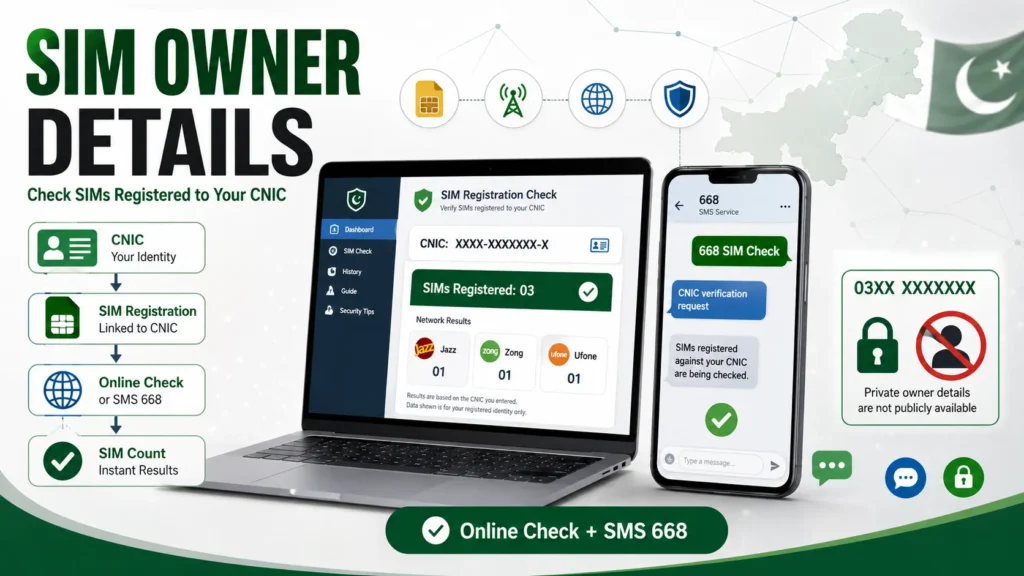
If you want to check SIM owner details in Pakistan, the safest way is to check the SIMs registered against your own CNIC. You can do this online or by SMS.
I prefer the official self-check method because it helps you see how many SIMs are linked to your CNIC without giving your personal information to random SIM-checking websites.
There is one thing you should know before starting: a public service does not let you enter another person’s mobile number and get their private name, CNIC, or address. The official checking process is mainly for checking your own SIM registration.
Quick Answer
To check SIM owner details online in Pakistan, use the official SIM Information System and enter your own 13-digit CNIC. You can also send your CNIC number without dashes to 668 by SMS. These methods help you check the number of SIMs registered against your CNIC. They do not provide private details about another person from their mobile number.
How to Check SIM Owner Details Online in Pakistan

The online method is useful if you want to check your SIM registration from a phone or computer.
I would use the online option when I want to review my SIM information without sending an SMS.
Steps to Check SIM Details Online
- Open the official SIM Information System website.
- Enter your 13-digit CNIC number.
- Enter the CNIC without dashes.
- Complete the verification step shown on the page.
- Submit the information.
- Check the SIM count shown against your CNIC.
The result helps you see how many SIMs are registered under your identity, usually grouped by mobile network.
This is useful if you have used several SIM cards over the years and no longer remember all of them.
How to Check SIM Owner Details by SMS 668

If you do not want to use the online service, you can check your registered SIM count through SMS.
Send your 13-digit CNIC number without dashes to 668.
For example, if your CNIC is written with dashes on your card, remove the dashes before sending it.
The service returns information about the number of SIMs registered against your CNIC. The result is meant for checking your own registration record.
What Does 668 Tell You?
The 668 service is mainly a SIM count check.
It can help you find out whether SIMs are registered under your CNIC with different mobile operators. This makes it useful for finding registrations you may have forgotten about.
It does not work like a public database where you enter any mobile number and receive the person’s private information.
What Information Can You Check?
The phrase SIM owner details can mean different things.
For a normal CNIC-based check, the main purpose is to see SIM registrations connected to your identity.
| Information | Can you check it through the normal CNIC check? |
| SIM count against your CNIC | Yes |
| SIM registrations by network | Yes |
| Your own SIM registration issue | Yes, through the relevant operator |
| Another person’s name | No |
| Another person’s CNIC | No |
| Another person’s home address | No |
| Another person’s private SIM record | No |
| Private call history | No |
| Live location of a phone | No |
This distinction matters because many websites use terms such as SIM number details, SIM owner details, and SIM database as if they all mean the same thing.
They do not.
Can I Check SIM Owner Details by Mobile Number?
No public self-service tool should be treated as a way to find a stranger’s private identity from their phone number.
If you search for SIM owner details by number, you may find websites that claim they can show a person’s name, CNIC, address, or other private information.
I would avoid these websites.
A legitimate SIM verification process is linked to your own identity and proper verification. Telecom data also has privacy protections, so you should not expect a public search box that reveals another subscriber’s private record.
If you need to deal with a number because of fraud, harassment, or another serious issue, use the proper complaint or legal process instead of trying to obtain private information from an unofficial database.
SIM Owner Details Online Check vs SMS Check

Both methods can help you check SIMs linked to your CNIC, but they work in different ways.
| Method | What you need | Best for |
| Online SIM check | Internet and your CNIC | Checking SIM registrations on a screen |
| SMS 668 | Mobile phone and CNIC | A quick SIM count |
| Mobile operator | Your identity and account details | SIM-specific problems |
| Operator service center | Original identification and verification | Ownership or registration issues |
I prefer the online check when I want a simple screen-based result. The SMS option is handy when I just want to check my registered SIM count.
How to Check if a SIM Is Registered in Your Name
If you have a SIM in your phone and want to make sure it is registered correctly, start with your CNIC-based SIM check.
Check the total number of SIMs shown against your identity.
Then ask yourself:
- Do I recognize these SIM registrations?
- Have I previously used another SIM?
- Did I replace or stop using an old number?
- Is there a network listed that I have never used?
- Could someone have registered a SIM using my identity without my knowledge?
If the number of registered SIMs looks higher than expected, do not ignore it.
What to Do If an Unknown SIM Is Registered on Your CNIC

Finding an unknown SIM registration can be worrying, but there are clear steps you can take.
1. Check the SIM count again
Run the CNIC check again to make sure the result was entered correctly.
If the same unexpected registration appears, continue with the next step.
2. Contact the relevant mobile operator
Find out which network has the unexpected registration.
Contact that operator through its official customer service channel or visit its service center.
Take your original identification document if you need an in-person verification.
3. Ask for the registration to be reviewed
Explain that you do not recognize the SIM registration.
The operator can tell you what steps are available to correct the record or remove a SIM that should not be linked to your identity.
4. Keep your complaint details
If you make a complaint, save the complaint number, date, and any other useful information.
I recommend keeping these details until the issue is fully resolved.
5. Check again later
After the operator takes action, check your SIM registrations again.
This gives you a simple way to confirm whether the unwanted registration has been removed.
The telecom regulator has also advised consumers to check SIMs registered in their name and take action on SIMs issued without their knowledge.
Why You Should Avoid Fake SIM Owner Details Websites
A quick Google search can bring up websites promising things such as:
- SIM owner name by number
- CNIC details by mobile number
- SIM database search
- live SIM tracking
- complete SIM owner information
- free SIM owner details
- phone number owner address
I would not enter my CNIC or phone number into these sites.
There are several risks.
Your personal information may be collected
A website asking for your CNIC may store or misuse the information you enter.
You have no good reason to give sensitive identity information to an unknown website just because it promises a SIM lookup.
The result may be fake
Some websites show old, incomplete, or made-up information.
A page displaying a name beside a phone number does not prove that the information is current or correct.
You may expose yourself to scams
Some fake SIM-checking pages may ask for:
- CNIC numbers
- phone numbers
- OTP codes
- email addresses
- passwords
- payment details
Never give an OTP to a website claiming it needs the code to show SIM owner details.
Is There a Free SIM Owner Details Check?
Yes, you can check SIM registrations against your own CNIC through the available official checking system.
The online method is useful when you want to check your SIM information without relying on an unofficial website.
The 668 SMS method is another option for checking the number of SIMs registered against your CNIC.
The word free needs some care, though.
A free official self-check is very different from a website claiming to give you another person’s private information for free.
If a site promises a stranger’s full name, CNIC, address, and other private data at no cost, I would treat that as a warning sign.
SIM Owner Details vs SIM Number Details
People often use SIM owner details and SIM number details as if they mean the same thing.
They can refer to different information.
SIM owner details usually refers to information connected with the registration or ownership of a SIM.
SIM number details can refer to information about the mobile number itself, such as its network or registration status.
For example, if you want to know how many SIMs are registered against your CNIC, you need a CNIC-based SIM check.
If you want to know who owns another person’s number, the normal public SIM check does not provide that private information.
What Is SIM Registration?
SIM registration connects a mobile SIM with the identity information provided during the registration process.
In Pakistan, SIM activation uses identity verification. This helps connect the SIM with the correct subscriber and reduces the risk of anonymous SIM use.
This is also why your CNIC is important during SIM registration.
If someone obtains or uses a SIM registered under your identity, it can create problems for you. Checking your registered SIMs from time to time is a simple way to spot something you do not recognize.
Can I Check SIM Details Without a CNIC?
For a CNIC-based ownership check, you need your own identification information.
The purpose of the main SIM Information System is to let subscribers check SIMs registered against their identity.
You should not expect to enter a random phone number and receive that subscriber’s private ownership record.
If you need information about a SIM you personally use, your mobile operator can guide you through its own verification process.
What If I Lost My Old SIM?
If you stopped using a SIM but never properly closed or disowned it, it may still be connected to your identity.
This is one reason I recommend checking your registered SIM count after changing numbers or stopping the use of an old SIM.
If an old registration still appears, contact the relevant mobile operator and ask about the correct process for removing it.
Do not assume that simply throwing away an old SIM card removes its registration.
Can I Check SIM Owner Details for Every Network?
The CNIC-based system is useful because it brings SIM registration information together instead of making you check every mobile network separately.
The result can show the number of SIMs associated with your CNIC across mobile operators.
This is much easier than trying to remember every SIM you have used.
If you see an unexpected network in the result, contact that operator for help.
Common Mistakes People Make During a SIM Check
A few simple mistakes can cause problems.
Entering the CNIC with dashes
When using the 668 SMS method, send the CNIC without dashes.
Using an unofficial website
Avoid random websites that promise complete SIM owner information.
Assuming a SIM count shows every phone number
The CNIC-based check is mainly a registration count service. Do not assume that the result is a public list of every mobile number.
Ignoring an unknown registration
If the result shows more SIM registrations than expected, take action instead of leaving the issue unresolved.
Sharing an OTP
Never share an OTP with someone who claims they need it to check SIM owner details.
How to Keep Your SIM Information Safe

You can reduce the risk of SIM-related fraud by following a few simple habits:
- Check SIMs registered against your CNIC from time to time.
- Buy SIMs through proper registration channels.
- Never give your OTP to another person.
- Do not upload your CNIC to unknown SIM-checking websites.
- Keep track of old SIMs that you no longer use.
- Report an unknown SIM registration as soon as you find it.
- Avoid apps or websites that promise private owner information.
- Use official operator channels for account and SIM problems.
Proper SIM verification matters because illegally issued SIMs can be connected to identity misuse and other crimes.
Final Takeaway
If your goal is to check SIM owner details online in Pakistan, start with your own CNIC. The online SIM Information System and 668 SMS service can help you check how many SIMs are registered against your identity.
I would avoid any website that promises a stranger’s name, CNIC, address, or complete SIM record from a mobile number. If you find a SIM you do not recognize on your CNIC, contact the relevant operator and get the registration reviewed instead of relying on an unofficial SIM database.
Frequently Asked Questions
How can I check SIM owner details online in Pakistan?
Use the official SIM Information System and enter your own 13-digit CNIC. The system lets you check SIM registrations linked to your identity.
How can I check SIMs registered on my CNIC?
You can use the online SIM Information System or send your 13-digit CNIC without dashes to 668. The result shows the number of SIMs registered against your CNIC.
Can I check SIM owner details by phone number?
You cannot use the normal public self-check service to reveal another person’s private name, CNIC, or address from a phone number.
Does 668 show the owner’s name?
The 668 service is used to check the number of SIMs registered against your CNIC. It is not a public tool for searching another person’s name from their mobile number.
Can I check SIM details without my CNIC?
A CNIC is needed for the normal CNIC-based SIM registration check. If you need help with a SIM you personally use, contact the relevant mobile operator.
What should I do if I find an unknown SIM on my CNIC?
Contact the mobile operator connected with that registration and ask them to review the SIM. If the issue is not resolved, use the available telecom complaint process.
Is SIM owner information public in Pakistan?
No. You should not expect a legitimate public database that gives anyone another subscriber’s private identity information just from a mobile number. Telecom subscriber data has privacy and security controls.
Can I find someone’s address from their SIM number?
You should not use random websites or databases that claim to provide a person’s private address from a phone number. These claims can be false and may put your own information at risk.
Is a SIM registered to my CNIC if I am using it?
Not necessarily. Using a SIM and having it registered under your own identity are two different things. Check your CNIC-based SIM registration if you want to confirm your own records.
What is the safest way to check SIM owner details?
For your own SIM registration, use the official online SIM Information System or the 668 SMS service. Avoid websites that promise private information about other people.