 Skip to content
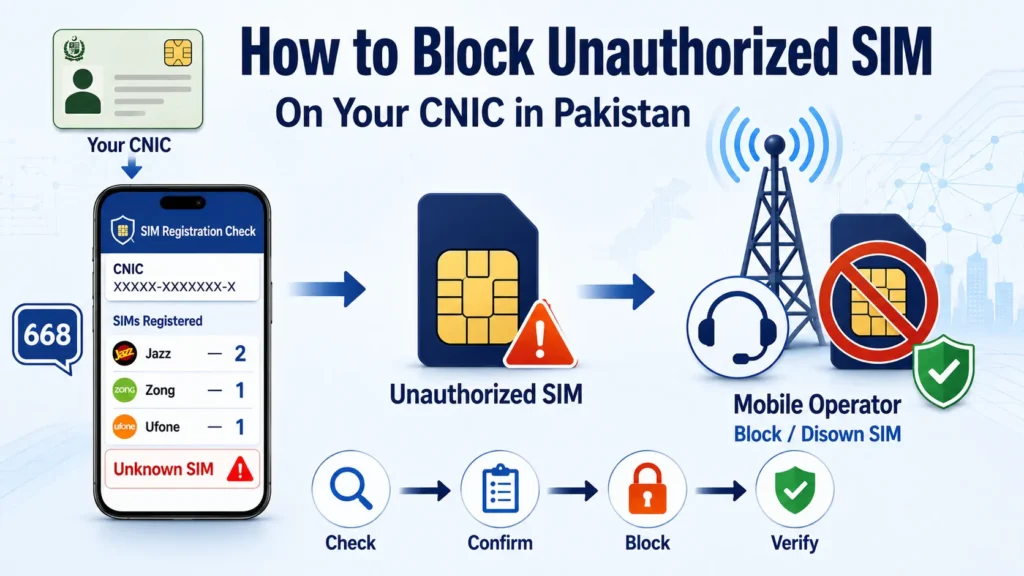
If you find a SIM registered against your CNIC that you do not recognize, I would deal with it as soon as possible. An unfamiliar SIM does not always mean fraud, because it could be an old connection or one you have simply forgotten about. But if you confirm that you never authorized it, you should contact the relevant mobile operator and request that the connection be blocked or disowned.
The first step is to check your SIM registration record, identify the network involved, and then take the issue to that operator. If the problem is not resolved, you can use the telecom complaint process to escalate it.
Quick Answer
To block an unauthorized SIM on your CNIC, first check your SIM registration record and identify the mobile network linked to the unfamiliar connection. Contact that network and request blocking or disowning of the SIM. Complete any required identity verification, keep your complaint or reference number, and check your CNIC record again after the request is processed. If the operator does not resolve the issue, escalate the complaint through the telecom complaint system.
What Is an Unauthorized SIM?
An unauthorized SIM is a mobile connection registered against your CNIC that you did not request, purchase, or approve.
For example, you may check your SIM registration and discover that more connections are linked to your CNIC than you actually use. You may also recognize the network but know that you never obtained a SIM from that operator.
There can be several reasons for an unfamiliar registration. You may have forgotten about an old SIM, a family member may be using a connection registered in your name, or a SIM may have been issued without your permission.
I would confirm the situation before reporting a connection as unauthorized. The goal is to remove a SIM that genuinely does not belong to you, not accidentally disconnect a legitimate number.
How to Check for an Unauthorized SIM on Your CNIC

Before you try to block anything, check how many SIMs are registered against your CNIC.
The SIM Information System allows you to enter your CNIC and see the number of registered SIMs by network. The current result page separates voice and data SIMs, data-only SIMs, and total SIMs.
You can also use the 668 SIM check to review SIM registrations associated with your CNIC. Current consumer guidance recommends checking the number of SIMs issued in your name and taking action if you find an illegally issued connection.
If the result is higher than expected, don’t assume every extra SIM is fraudulent. First think about old numbers, unused connections, and SIMs used by people in your household.
For a full step-by-step guide, you can refer to your separate article on how to check SIMs on CNIC.
How to Block an Unauthorized SIM in Pakistan
Once you have confirmed that a SIM does not belong to you, follow these steps.
Step 1: Confirm the Registration

Start by checking your CNIC record again.
Write down the mobile network showing the unfamiliar registration. If you have access to the actual number, keep that information as well.
This step matters because the mobile operator handling the connection will usually need enough information to locate the registration.
Step 2: Identify the Mobile Network

Find out which network is associated with the unauthorized SIM.
For example, the registration may appear under Jazz, Zong, Ufone, Telenor, or another operator shown in the current SIM Information System.
Don’t rely only on the first few digits of a number to identify the network. Number portability can make prefix-based assumptions unreliable. If you have the actual number, confirm its current network before contacting the operator.
Step 3: Contact the Mobile Operator
Contact the relevant mobile network and explain that a SIM is registered against your CNIC without your authorization.
I would keep the request simple:
“A SIM is registered against my CNIC that I did not authorize. I want to report it and request that it be blocked or disowned.”
The operator may ask you to verify your identity before taking action. This is normal because the request concerns a connection registered under your identity.
Depending on the operator’s current procedure, you may be directed to a customer service center, franchise, or another approved channel.
Step 4: Visit the Operator’s Service Center if Required

If the operator asks you to visit a service center or franchise, take your original CNIC with you.
Tell the representative that you found an unfamiliar SIM registration and want it removed from your CNIC.
You may need to complete identity or biometric verification before the operator can process the request. The exact procedure can vary by operator and may change over time.
I would also ask the representative to confirm that the request has been recorded.
Step 5: Ask for a Complaint or Reference Number

Don’t leave the process without keeping some record of your request if one is provided.
A complaint or reference number gives you something to use when you follow up. It is especially useful if the SIM continues to appear against your CNIC after you were told that the request had been processed.
Keep the number, date, operator name, and any other useful details until the matter is closed.
Can You Block an Unauthorized SIM Online?
This is where it is easy to confuse two different processes.
The online SIM Information System is useful for checking SIM registrations against your CNIC. It is not the same thing as a universal online button for blocking every unauthorized SIM. The current system is presented as a way to find the total SIMs registered against a CNIC.
Blocking or disowning a specific connection is handled through the relevant mobile operator’s process.
Some operators may provide digital or phone-based support for certain requests, but I would check the operator’s current instructions rather than relying on an old blog post or social media message.
Can You Block an Unauthorized SIM Through 668?
I would not treat 668 as a direct SIM-blocking service.
The SIM Information System uses 668 as a way to check SIMs associated with a CNIC, and current guidance also recommends checking your registrations through this process.
If you find an unauthorized connection, the safer process is to use the information from your SIM check and contact the relevant mobile operator.
In simple terms:
668 helps you check. The mobile operator handles the connection.
This distinction is useful because many online pages describe 668 as if it can directly block any unknown SIM. I would not follow such instructions unless they match the current instructions from the relevant service provider.
What Documents Do You Need to Block an Unauthorized SIM?
Your original CNIC is the main document I would keep ready.
The operator may also ask for additional information to confirm that you are the registered CNIC holder and to identify the connection in question.
If you have already contacted customer support, take your complaint or reference number with you.
If you know the unauthorized mobile number, keep that information available as well.
The exact requirements can differ between operators, so confirm them before visiting a service center.
What If You Don’t Know the Unauthorized SIM Number?
This situation is common.
The SIM Information System may show you the number of SIMs associated with each network without giving you a complete list of private subscriber details. The current public result is organized around network and SIM counts.
If you know that the number of SIMs on your CNIC is higher than expected but you don’t know which number is unfamiliar, contact the relevant operator.
Tell them that the SIM count on your CNIC includes a connection you did not authorize and ask what information or verification is needed to identify and disown the unwanted connection.
What If the Mobile Operator Does Not Resolve the Problem?
If you have already contacted the operator and the unauthorized SIM remains linked to your CNIC, keep your previous complaint details and escalate the issue.
The telecom complaint system allows consumers to submit complaints, monitor their status, and receive updates.
When submitting a complaint, I would include:
- Your name and CNIC details as requested by the complaint system
- The mobile network involved
- The unauthorized SIM information you have
- The date you contacted the operator
- Your operator complaint or reference number
- A short explanation of the problem
- Any relevant supporting information
Keep your explanation factual. You don’t need to claim that a crime occurred unless you have evidence to support that claim.
Should You Report an Unauthorized SIM as Fraud?
Not every unfamiliar SIM is automatically a fraud case.
For example, you may discover an old SIM that you forgot about. A family member may also be using a number that was registered under your CNIC.
However, the situation is more serious if you are certain that you never applied for the SIM and someone appears to have used your identity or biometric information to obtain it.
Illegal SIM issuance is a known telecom security concern, and current guidance advises users to check SIMs issued in their name and take action against illegally issued connections.
I would first get the registration issue addressed through the operator. If there are signs of identity misuse, scams, financial loss, or another form of cybercrime, keep your records and use the appropriate complaint or law-enforcement channel as well.
What Should You Do After Blocking the Unauthorized SIM?

Don’t stop after making the request.
Once the operator confirms that the connection has been blocked or disowned, check your SIM registration again.
Compare the new result with your own active connections.
The goal is to make sure the unwanted registration has been removed and that your legitimate SIMs are still correctly registered.
I also recommend keeping your complaint details until the registration record has been updated.
How Long Does It Take to Remove an Unauthorized SIM From Your CNIC?
I would avoid relying on a fixed number of hours or days.
Processing time can depend on the mobile operator, the type of request, identity verification, and any review required.
Instead of assuming that the SIM will disappear immediately, keep your reference number and check the registration again after the operator confirms that the request has been processed.
If the SIM still appears, follow up using your previous complaint details.
Can an Unauthorized SIM Cause Problems for the CNIC Holder?
A SIM registered under your CNIC is associated with your identity in the telecom registration system.
That is why I would take an unfamiliar registration seriously, even if you have never used the number.
Official cybersecurity guidance warns about illegally issued SIMs and recommends checking the number of SIMs issued in your name and blocking illegally issued connections.
This does not mean that every unknown SIM has been used for illegal activity. It means you should correct the registration if you did not authorize it.
How to Protect Your CNIC From Unauthorized SIM Registration

A few simple habits can reduce the risk of future problems.
Check Your SIM Registrations Periodically
I would check the SIMs registered to my CNIC from time to time, especially if I have recently stopped using an old number.
Regular checks make it easier to spot an unexpected change.
Use Authorized SIM Sales Channels
When buying a new SIM, use an authorized mobile operator franchise or approved service channel.
Avoid handing over your biometric information to unknown sellers or people offering SIMs through unofficial methods. Current cybersecurity guidance specifically recommends obtaining SIMs through authorized cellular franchises rather than informal sales points.
Don’t Share OTPs
Never give an OTP to someone who calls you and claims to be from a mobile operator, bank, government department, or another service.
If you receive an unexpected verification code, don’t share it.
Keep Your CNIC Information Private
Your CNIC number is sensitive identity information.
Don’t send a picture of your CNIC to random people or unknown websites just because they promise a SIM check, prize, loan, job, or other service.
Be Careful With Biometric Verification
Only complete biometric verification for a service you actually requested.
If someone asks for your thumb impression or biometric verification for an unclear reason, stop and verify the purpose first.
Common Mistakes to Avoid
Trying to block the SIM through a random website
Use the established mobile operator and telecom complaint channels instead of websites claiming they can remove a SIM from your CNIC.
Assuming an extra SIM automatically means fraud
First check whether it is an old connection or a legitimate number used by someone you know.
Relying on outdated 668 instructions
Online SIM-related guides can remain indexed for years. A process that worked in the past may not be the current process.
Use 668 for the SIM registration check and confirm the current blocking process with the relevant operator.
Forgetting to check again
Making a complaint is not the final step.
Once the operator says the connection has been removed or blocked, check your SIM registration again.
Not keeping your complaint number
If the issue continues, your reference number can make follow-up much easier.
Final Takeaway
If you find an unauthorized SIM on your CNIC, don’t panic and don’t rely on random online blocking methods.
I would follow a simple process: check the registration, confirm the unfamiliar connection, identify the network, contact the operator, request blocking or disowning, keep the reference number, and check your CNIC record again afterward.
If the operator does not resolve the issue, escalate the complaint through the telecom complaint system. Taking these steps gives you a clear record of the problem and helps make sure an unwanted SIM is no longer linked to your identity.
Frequently Asked Questions
How do I block an unauthorized SIM on my CNIC?
Check your SIM registration first, identify the network involved, and contact that mobile operator. Request that the unauthorized connection be blocked or disowned and complete any required identity verification.
Can I remove an unauthorized SIM from my CNIC online?
The SIM Information System is used to check registrations, while blocking or disowning a specific connection is handled through the relevant operator’s process. Check the operator’s current support options for any online service.
Can I block an unauthorized SIM by sending a message to 668?
668 is used for checking SIM registrations against a CNIC. I would not rely on claims that sending an unauthorized number to 668 automatically blocks it. Contact the relevant mobile operator for the blocking or disowning request.
What if I find an old SIM registered to my CNIC?
If you recognize the SIM but no longer use it, contact the relevant operator and ask about the correct process for closing or disowning the connection. Don’t assume an old SIM is unauthorized simply because you no longer use it.
What if I don’t know the number of the unauthorized SIM?
Start with your CNIC-based SIM registration result and identify the network with an unexpected count. Then contact that operator and explain that you have an unfamiliar registration on your CNIC.
What should I do if the operator refuses to remove the SIM?
Keep your operator complaint or reference number and escalate the issue through the telecom complaint system. Include the details of your earlier request when submitting the complaint. The complaint system supports complaint registration and status tracking.
Should I check my CNIC again after blocking a SIM?
Yes. I recommend checking again after the operator confirms that the SIM has been blocked or disowned. This helps you confirm that the registration record has been updated.
Is an unknown SIM on my CNIC always a sign of identity theft?
No. It could be an old connection or a legitimate SIM you forgot about. But if you are certain that you never authorized it, treat the registration as a problem and contact the relevant operator.